Disclosure: The Design Tools sells advertising, including the placements described near the end of this guide. Everything before that section is written to be useful whether or not you ever buy from us, and prices for other channels come from their own pages, checked on 12 September 2026.
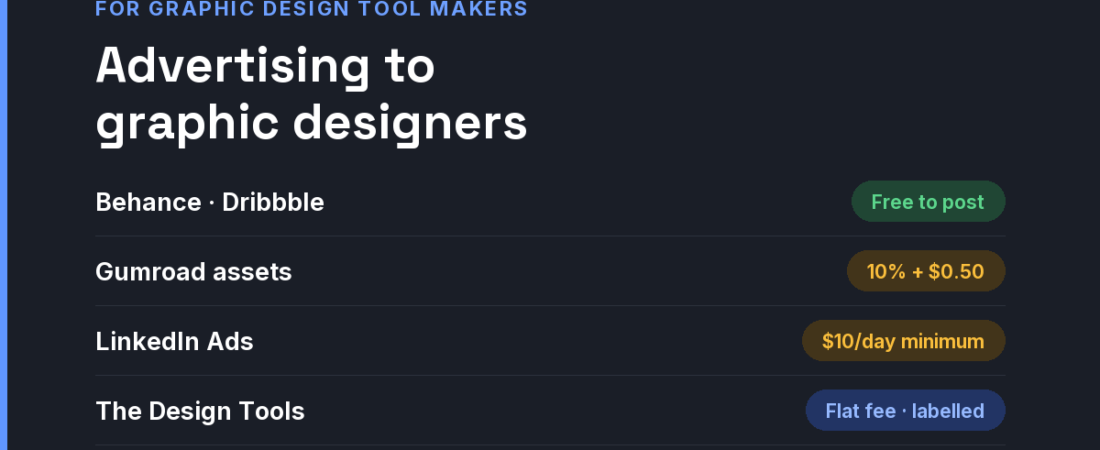
Short answer: Graphic designers are the broadest design audience — freelancers, in-house teams and students — and among the most price-aware. They discover tools through work they admire, tutorials and searches for alternatives to the software they already pay for. Show output on portfolio platforms (free), sell assets where designers shop (Gumroad takes 10% + $0.50 direct), buy search for “alternative to” queries, and use flat-fee placements where designers compare tools.
What shapes this audience
- Subscription fatigue is real. Many designers already pay for a suite and resent it. One-time licences, generous free tiers and open-source options are selling points in themselves — say so in the headline.
- Compatibility is the first objection. Can it open and export PSD, AI, SVG and print-ready PDF? Does it handle CMYK and spot colours? A beautiful app that cannot hand a file to a printer is a toy to a working designer.
- Output sells, not interfaces. Designers are persuaded by work made with a tool. A gallery of real client-quality pieces converts better than a feature tour.
- Students become buyers. Education pricing is a long-term channel: the tool someone learns on is often the tool they bring to their first job.
The channels, compared
| Channel | What it costs | Audience intent | Best for |
|---|---|---|---|
| Portfolio platforms (Behance, Dribbble) | Free to post work made with your tool | Inspiration browsing; low buying intent | Showing output quality over time |
| YouTube tutorial creators | Negotiated; no public rate cards | Learning intent — high trust | Tools with a learning curve |
| Google Ads | All-industry average CPC $5.26 (WordStream, 2025); “alternative to [incumbent]” queries are the valuable ones | High | Challengers to established software |
| LinkedIn Ads | $10 minimum daily budget; $100 minimum lifetime for new campaigns | Low intent, precise targeting of in-house roles | Team and enterprise plans |
| Gumroad (fonts, brushes, templates) | 10% + $0.50 direct; 30% through Discover | Ready-to-buy asset shoppers | Font foundries and asset makers |
| Niche design-tool sites (like ours) | Flat fees; ours start at $19 | Designers comparing tools in one discipline | Challengers and new tools testing a message |
If your tool is an alternative to an incumbent, lean into it. Designers searching for alternatives have already decided to leave; they are looking for permission. Our alternatives guides and open-source hub exist for exactly that reader.
A 30-day plan for a small budget
- Week 1 — publish the compatibility table. Every format you open and export, colour modes, and what does not work yet. Honesty here prevents refunds.
- Week 1 — build a real gallery. Ten pieces a working designer would be proud to show, each crediting who made it.
- Week 2 — find three tutorial creators. Offer free licences first. A genuine tutorial outlives any ad.
- Week 3 — buy alternative-intent placements. A capped search test on “alternative to” queries plus a placement on the Graphic Design discipline page.
- Week 4 — launch education pricing. Students are next year’s paying customers, and they talk to each other.
Where The Design Tools fits — and where it does not
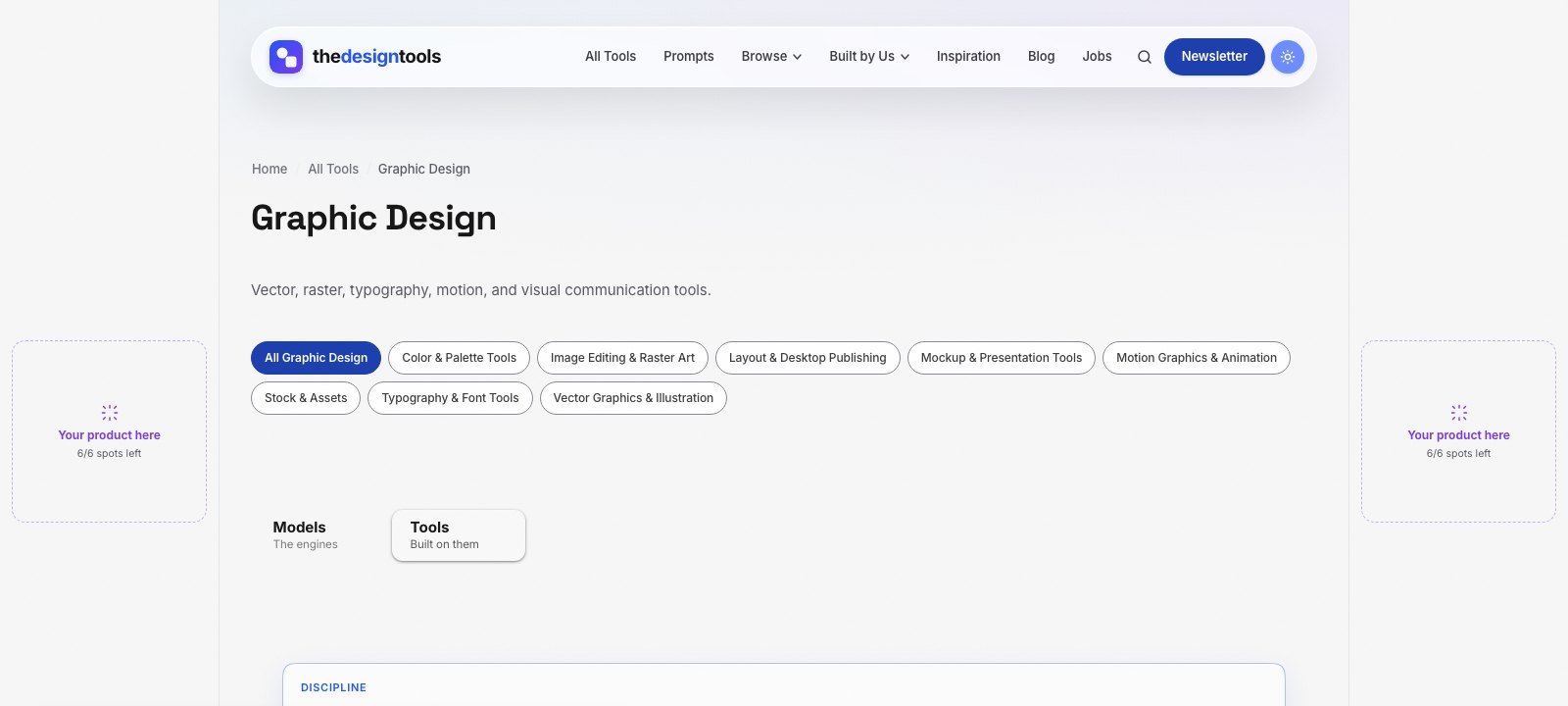
The Design Tools is an independent directory of design tools across nine disciplines. One of them is Graphic Design — vector, raster, typography, motion and layout tools — and every tool we review there is listed with its real drawbacks, not just its strengths. Graphic designers arrive to choose a tool, which is the moment a placement is worth something.
What you can buy, as of September 2026:
- Discipline page sponsorship — a labelled placement on the Graphic Design page, $29 per 4 weeks. The smallest audience on the site, and the most decided one.
- Blog article sponsorship — a relevant article featured on the blog for a month, $39.
- Sitewide sponsor slot — a card in the sponsor rail on every page. Live availability is below.
- Launch package — every placement together for one 4-week run, $199.
Where it does not fit: we are a young, independent site that launched in July 2026, so our audience is small. If you want mass consumer reach — people making a birthday card — social ads will do more. If you want working designers evaluating a serious tool, that is who uses this page. Ask us for the page’s recent traffic before you pay.
The rules we will not bend: every placement is labelled Sponsored and links with rel="sponsored". Sponsoring never changes a ranking or removes a drawback from a review (the only paid way into the directory is a $29 Maker Verified listing, and those pages are marked as paid) — listing is free and editorial. That is why a recommendation here is believed, and it is what a sponsor is paying to stand next to.
See every placement and send an inquiry → We reply within 24 hours.
Frequently asked questions
How do I market an alternative to Photoshop or Illustrator?
Say it plainly. Designers searching for alternatives have already decided to leave, so lead with compatibility (PSD, AI, PDF, CMYK), the pricing model, and a gallery of real work. Then be present on the pages where they compare alternatives.
Is it worth sponsoring YouTube design tutorials?
For tools with a learning curve, often yes, because tutorial viewers are actively learning and trust the creator. Start by offering free licences; paid sponsorships are negotiated individually and rarely have public rates.
Where do graphic designers discover new tools?
Through work they admire on portfolio platforms, tutorials, peers, and searches for alternatives to software they already pay for. Directories organised by discipline catch them at the moment of comparison.
What do I get with a discipline page sponsorship?
A labelled placement on one discipline page — here, Graphic Design — for 4 weeks, at $29 as of September 2026. It is the smallest audience on the site and the one closest to a decision.
Does sponsoring The Design Tools get my tool listed or ranked higher?
No. Listing is free and editorial, and sponsorship is labelled and kept separate from it. Sponsoring never changes a ranking or removes a drawback from a review (the only paid way into the directory is a $29 Maker Verified listing, and those pages are marked as paid).
{“@context”: “https://schema.org”, “@type”: “FAQPage”, “mainEntity”: [{“@type”: “Question”, “name”: “How do I market an alternative to Photoshop or Illustrator?”, “acceptedAnswer”: {“@type”: “Answer”, “text”: “Say it plainly. Designers searching for alternatives have already decided to leave, so lead with compatibility (PSD, AI, PDF, CMYK), the pricing model, and a gallery of real work. Then be present on the pages where they compare alternatives.”}}, {“@type”: “Question”, “name”: “Is it worth sponsoring YouTube design tutorials?”, “acceptedAnswer”: {“@type”: “Answer”, “text”: “For tools with a learning curve, often yes, because tutorial viewers are actively learning and trust the creator. Start by offering free licences; paid sponsorships are negotiated individually and rarely have public rates.”}}, {“@type”: “Question”, “name”: “Where do graphic designers discover new tools?”, “acceptedAnswer”: {“@type”: “Answer”, “text”: “Through work they admire on portfolio platforms, tutorials, peers, and searches for alternatives to software they already pay for. Directories organised by discipline catch them at the moment of comparison.”}}, {“@type”: “Question”, “name”: “What do I get with a discipline page sponsorship?”, “acceptedAnswer”: {“@type”: “Answer”, “text”: “A labelled placement on one discipline page — here, Graphic Design — for 4 weeks, at $29 as of September 2026. It is the smallest audience on the site and the one closest to a decision.”}}, {“@type”: “Question”, “name”: “Does sponsoring The Design Tools get my tool listed or ranked higher?”, “acceptedAnswer”: {“@type”: “Answer”, “text”: “No. Listing is free and editorial, and sponsorship is labelled and kept separate from it. Sponsoring never changes a ranking or removes a drawback from a review (the only paid way into the directory is a $29 Maker Verified listing, and those pages are marked as paid).”}}]}
Sources and when we checked them
All prices and terms were checked on 12 September 2026. Platforms change their pricing often — confirm on the linked page before you budget.
- WordStream — Google Ads Benchmarks 2025 — all-industry average CPC $5.26
- LinkedIn Marketing Solutions — Making the most of your budget — $10 minimum daily budget, $100 minimum lifetime budget for new campaigns
- Gumroad — Pricing — 10% + $0.50 direct, 30% via Discover
122 ready-to-use AI prompts — organised by discipline and category, each copyable in one click, free and no sign-up needed. Browse the prompt library →