Last updated: October 12, 2026. Every parity figure below was read from the project’s own roadmap files, not from a press release.
TL;DR: ArtCraft has rebuilt the Adobe Creative Suite as twelve free, open-source apps written entirely in Rust, with Anthropic’s Claude doing most of the typing. PhotoCraft is the flagship: layers, masks, adjustment layers and real PSD files, wearing Photoshop’s menus and shortcuts. The catch is in the project’s own spreadsheet. PhotoCraft’s roadmap puts “ready for real work” at about 45%, two weeks after launch. Install it to experiment. Don’t move a client deadline onto it yet.
Quick verdict
If you want to poke at it: grab PhotoCraft from getartcraft.com. It’s free, open source, no account, no telemetry, and it runs on macOS, Windows and Linux. Most of the other apps also run in the browser through WebAssembly.
If you’re weighing it against a real workflow: it’s not the replacement, it’s the interesting one. The layouts are familiar enough that your hands work immediately, which is the whole pitch. The parts of Photoshop that actually decide whether a job ships — performance, plug-ins, colour management under pressure — are the parts that are least finished.
What actually got built
This started as a Reddit post in late September from a user named ai_art_is_art. The post got removed; the commenter’s GitHub link survived. Two weeks later there are twelve repositories, most of them past ten thousand stars.
The umbrella name is ArtCraft, and the apps are called the Crafting Apps. Every one is pure Rust under a permissive licence (Apache-2.0 or MIT), compiled to native desktop binaries. No Electron, no web views wrapped around a webpage, no account required.
| App | Stands in for | Stage | Runs on |
|---|---|---|---|
| PhotoCraft | Adobe Photoshop | Early alpha | macOS, Windows, Linux, Web |
| VectorCraft | Adobe Illustrator | In development | macOS, Windows, Linux, Web |
| FilmCraft | Adobe Premiere Pro | In development | macOS, Windows, Linux |
| LightCraft | Adobe Lightroom | In development | macOS, Windows, Linux, Web |
| PdfCraft | Adobe Acrobat Pro | Early alpha | macOS, Windows, Linux, Web |
| EffectCraft | Adobe After Effects | In development | macOS, Windows, Linux, Web |
| DesignCraft | Adobe InDesign | Pre-alpha | macOS, Windows, Linux, Web |
| WordCraft | Microsoft Word | In development | macOS, Windows, Linux, Web |
| SoundCraft | Digital audio workstations | In development | macOS, Windows, Linux, Web |
| DeckCraft | Microsoft PowerPoint | In development | macOS, Windows, Linux, Web |
| CADCraft | AutoCAD | In development | macOS, Windows, Linux, Web |
| GridCraft | Microsoft Excel | In development | macOS, Windows, Linux, Web |
The Microsoft Office and AutoCAD entries are the newest. The developer has said he’s willing to pay contributors, and the stated bet is blunt: everything can be free, cross-platform and open source if it’s written in Rust.
One clarification on cost. The Crafting Apps themselves are free and don’t need a subscription. The parent company sells credits for ArtCraft, its separate AI image and video studio, from about $8 a month. Different product, same family.
Why the familiar interface is the actual idea
There are already plenty of free Photoshop alternatives, and they’re all fine. The problem was never availability — it was muscle memory. Every one of them lays out panels differently, so even a good tool costs you an afternoon of relearning before you’re productive.
ArtCraft’s answer was to keep Adobe’s menus, panel positions and keyboard shortcuts exactly where a Photoshop user expects them. You install it, you open a file, and you start working. That’s it. No tutorial.
The second idea is agent-native. Every action in these apps is a discrete command, exposed three ways: through the interface, through a command line, and through a JSON control channel plus an MCP server. That means an AI agent can drive the editor the same way a person does. It’s the one genuinely novel engineering decision in the whole project, and it’s the reason to care even if you never open the GUI.
The Rust choice is doing real work too. Native binaries that start instantly and don’t eat battery. PhotoCraft renders through wgpu, so it gets Metal, Vulkan and WebGPU acceleration. FilmCraft ships its own H.264, HEVC, ProRes and AAC codecs instead of bundling FFmpeg. Those are the kinds of decisions you don’t make while vibe-coding; someone thought about them.
What PhotoCraft actually does
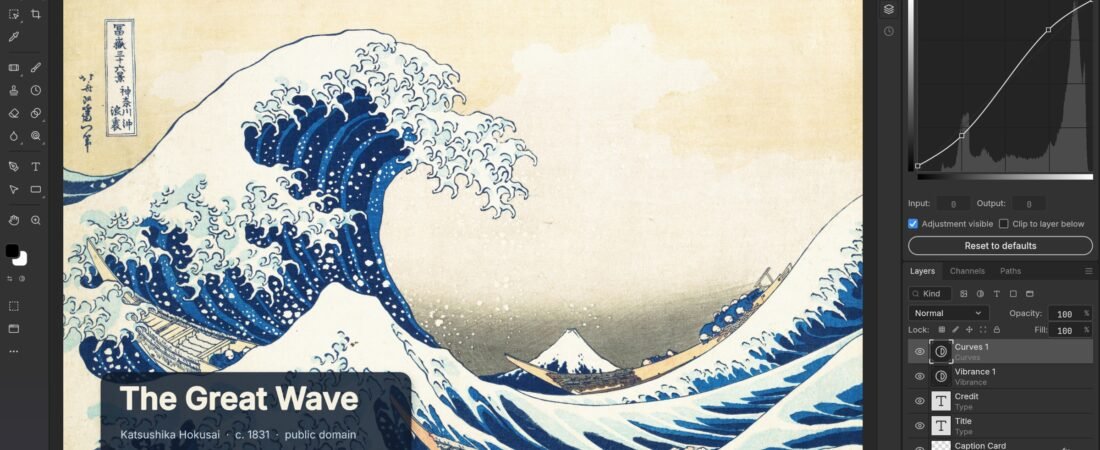
Underneath the familiar chrome, the feature list is genuinely long. Groups, clipping masks, pixel and vector masks, fill layers, adjustment layers, live smart objects with smart filters, 27 Photoshop blend modes plus six Paint.NET variants, alpha channels, Quick Mask, colour labels. Type, vector shapes, paths, a brush engine, camera raw.
Adjustment layers are the part that feels most solid, and they behave the way they should:

Masks and selections are the second strong area:

Layer styles, including stroke, glow and the rest of the Photoshop dialog, are there too:

On file handling, the PSD support is a separate crate written from Adobe’s public specification and tested against a corpus of real-world files. The project reports byte-for-byte saves on 134 of 135 files in its own test corpus, and pixel-accurate rendering on 115 of 170 files. Read those as the developers’ own numbers, not an independent audit.
The numbers the project publishes about itself
Here’s the part worth slowing down for. Headlines around this story have been quoting a plan to hit 100% parity in a month. The repositories were created on September 30, 2026, and each one now carries a roadmap file with a measured assessment. This is what they say, as reviewed October 10–12:
| App | Feature breadth | Ready for real work | Hours left to full parity |
|---|---|---|---|
| PhotoCraft (vs Photoshop 2026) | ~76% | ~45% (40–50%) | ~2,300–4,100 |
| VectorCraft (vs Illustrator) | ~88% | ~62% (57–67%) | ~170–270 |
| FilmCraft (vs Premiere Pro 2026) | ~86% | ~56% (51–61%) | ~400–700 |
| LightCraft (vs Lightroom Classic) | ~77% | ~61% (56–66%) | ~340–600 |
| EffectCraft (vs After Effects 2026) | — | ~50% | ~350–620 |
| PdfCraft (vs Acrobat Pro) | — | ~49% | ~400–700 |
| DesignCraft (vs InDesign 2026) | ~80% | ~47% (42–52%) | ~420–750 |
PhotoCraft’s own dimensions make the gaps concrete. Adjustments and filters are at 70%. Layers and masks at 65%. Type at 40%. UI and brush feel at 40%. Colour management at 70%. Then the three that matter commercially: performance at 25%, plug-ins and scripting at 15%, generative AI features at 10%.
The team is refreshing these weekly, and PhotoCraft’s roadmap is refreshing as fast as anything. It also notes 1,004 merged pull requests so far, with roughly 80% of the work parallelisable across independent crates. That’s the honest reason the numbers are climbing quickly. It’s also the reason to come back in a month rather than form an opinion today.
Is it piracy? The accusation, answered
Some of the reaction was about theft. One post shared the developer’s comment with the summary “Something really cool is happening: Piracy.”
The developer’s answer is that this is a clean-room reimplementation — written from public documentation and observed behaviour, with no Adobe source code used or copied. The PSD reader is the proof point he points to, since it’s built from Adobe’s own published file specification.
What nobody disputes is that the interface is deliberately familiar. That’s the design goal, not an accident, and it’s exactly where any legal question would live. Replicating a UI and menu structure is a different act from copying code, and how courts have treated it varies. Nobody has filed a suit. Treat this as an observation, not legal advice.
Should you trust code an AI wrote?
This is the fairest objection, and it deserves a straight answer rather than a deflection.
Sonar’s 2026 State of Code Developer Survey, run across 1,100 professionals, found that 96% don’t fully trust AI-generated code. The concern isn’t theoretical here. One person shipped potentially hundreds of thousands of lines across twelve applications in about two weeks, and verifying that without a review team is genuinely hard.
Counterweight: these are public repositories with open licences. Anyone can read them, build them and report a bug. That’s not nothing — closed-source software ships with far less scrutiny. The project asks for issues with OS, file size, layer count and a screenshot attached, and runs a Discord for the same.
Practical advice: run it in a sandbox, keep your real project files somewhere else until you trust it, and don’t feed it a client’s unreleased artwork while you’re still deciding.
What to do with it this week
- Install PhotoCraft next to Photoshop, not instead of it. Use the ArtCraft Launcher so every app updates from one place. Keep your Adobe install exactly as it was.
- Open a PSD you already know well. Same file, both apps. You’ll learn in five minutes what PhotoCraft handles and what it fudges.
- Test the honest edge cases. A 40-megapixel RAW, a file with 60 layers, a client PSD full of smart objects. That’s where alpha software tells you the truth.
- Try the MCP server. This is the part nobody else has. Drive a small edit from your AI assistant and see whether it holds up.
- Read the roadmap, not the README headlines. The
ROADMAP.mdanddocs/target-app-parity.mdfiles in each repo are unusually well documented. You’ll know more in five minutes than a week of forum browsing gives you. - Contribute if you have the hours. The stated gap is 400–700 hours for PhotoCraft’s essentials-only path. That’s the shortest route to something genuinely usable.
Where it falls short (honest part)
- It’s alpha software with alpha stability. The README itself says it is “not yet a Photoshop replacement for daily professional work” and asks you to expect rough edges. Believe the README.
- No plug-in ecosystem. At 15% ready, this is the hardest gap to close and the one that decides commercial work. Most studios run their look on third-party plug-ins.
- Performance is the weak spot. Three of twenty-five measured performance budgets are met. Expect to wait. On a real client file, that’s the difference between smooth and painful.
- No generative fill. At 10%, the AI features Adobe shipped hardest in the last three years are basically absent.
- Type is thin. 40% ready. If your work is setting type, this isn’t your tool yet.
- Risk of wasted client time. If you open a client’s file in an unproven editor and it corrupts the PSD on save, that’s your problem, not the developer’s. Test round-trips before you care.
- The “one developer” framing is already out of date. The repositories credit an ArtCraft team and multiple contributors. That’s better for the project, but it means nobody is verifying this with the rigour a commercial product would get.
FAQ – quick answers for search and AI
Is PhotoCraft a free Photoshop alternative?
It’s a free, open-source image editor built to replace Photoshop’s feature set, released under Apache-2.0. It’s honest about being early alpha, and its own roadmap puts it at roughly 45% ready for professional work. For learning, experiments and personal projects, yes. For paid client production, not yet.
What is ArtCraft?
An open-source project publishing a family of twelve native apps called the Crafting Apps, each written from scratch in Rust and each standing in for a commercial product — PhotoCraft for Photoshop, FilmCraft for Premiere Pro, LightCraft for Lightroom, and so on. ArtCraft is also the name of the company’s separate paid AI image and video studio, which sells credit plans.
Is PhotoCraft made with Claude?
Yes. The developer has said the apps were built largely with Anthropic’s Claude, with agents handling much of the implementation work. The commit history and the roadmap both reference agents explicitly. It’s one of the larger real-world demonstrations of agent-driven application development.
Can AI agents control PhotoCraft?
Yes, and this is deliberate. Every action is a discrete command, reachable through the interface, a command line, a JSON control channel, or an MCP server. That makes the app directly drivable by an AI agent rather than needing computer-use emulation, which is the more reliable approach.
How close is it really to Photoshop?
By the project’s own October 2026 roadmap: about 76% feature breadth and about 45% ready for real work, with an estimated 2,300–4,100 hours of work remaining for the full target. The weakest areas are performance, plug-in compatibility and generative features. For a simpler scope — core features only, no plug-ins — the estimate drops to 400–700 hours.
Is it legal to clone Photoshop this way?
The developer states it’s a clean-room reimplementation built from public specifications and observed behaviour, with no Adobe code used. That claim is consistent with how the PSD reader was written. Deliberately mirroring another product’s interface raises separate questions that vary by jurisdiction, and no legal action has been brought. Get your own advice before betting a business on it.
Does it run on Windows and Mac?
Yes. PhotoCraft ships native installers for macOS, Windows and Linux, and most of the other Crafting Apps also run in the browser via WebAssembly. FilmCraft is the exception — no browser build yet. The ArtCraft Launcher picks the right build for your machine and keeps it updated.
Sources checked October 12, 2026: each project’s ROADMAP.md and docs/target-app-parity.md on GitHub (storytold/photocraft, filmcraft, lightcraft, vectorcraft, effectcraft, designcraft, pdfcraft), getartcraft.com craft-apps and pricing pages, the GitHub REST API for repository licences and star counts on October 12, Tom’s Hardware October 8, Phoronix October 8, it-connect October 8, and Sonar’s 2026 State of Code Developer Survey.
122 ready-to-use AI prompts — organised by discipline and category, each copyable in one click, free and no sign-up needed. Browse the prompt library →